A carrier screenshot can look “official” for about five minutes, and then one quiet Apple Newsroom line resets the whole conversation. This guide is built around that reality: separate what was reported from what you can verify on Apple’s own pages, then apply a Canada lens (time zones, pickup patterns, and how carrier inventory language can differ by region). The goal is not to chase every rumor. It’s to make decisions you won’t regret when pages update, preorder windows open, and stock changes city by city. You’ll see a simple workflow you can reuse for any launch.
Release timeline and preorder timing for Canada
This section is only about timing you can plan around: the announcement moment, when preorders actually open, and when pickup becomes realistic in your area. Keep these as separate checkpoints so your reminders don’t drift.
The one anchor you can trust
If you want a single “confirmed cutoff,” use Apple’s Newsroom press release for the launch week you care about. That page typically contains the announcement day, the preorder opening time, and the retail availability date in one place. It’s also where Apple’s wording is most consistent, which helps you spot reposts that paraphrase too aggressively. When people debate timing online, they often blur three separate moments: announcement, preorder opening, and first-day pickup. Keep those separate in your notes, and your reminders stop drifting by a day.
Canada time zones: converting the preorder start
Apple often lists preorder openings in U.S. Pacific time. In Canada, the math is easy, but it’s also easy to misread when you’re skimming on a phone at 6 a.m. The table below is meant to be copied into your notes so you can reuse it for future launches.
| Canada region | Local time |
| Pacific | 5:00 a.m. |
| Mountain | 6:00 a.m. |
| Central | 7:00 a.m. |
| Eastern | 8:00 a.m. |
| Atlantic | 9:00 a.m. |
| Newfoundland | 9:30 a.m. |
A practical Canada note on launch day
If you plan to pick up in store, watch the difference between “available for pickup today” and “ships in 2–3 weeks.” Those phrases are not interchangeable, and they can change several times on launch day. Also, keep receipts and return windows in mind if you’re buying on a carrier plan versus Apple directly. Promotions in CAD can shift quickly, but return rules tend to be the real deciding factor when stock is tight.

How to verify updates without getting trapped by reposts
Treat this part as your “anti-chaos” system. It’s designed to work during peak rumor weeks, when reposts spread faster than official pages update and people quote each other in circles.
Build a “claim + source + timestamp” habit
Rumors can be useful as context, but they become actionable only after you find an official page that matches the wording on specs, dates, and availability. Instead of memorizing every rumor cycle, build a simple verification loop you can repeat. This matters even more with iphone 17 coverage because one viral screenshot can be reposted hundreds of times after the original disappears.
A fast checklist you can run in two minutes
Use this checklist whenever a post claims a change in timing, a new spec line, or a model-specific detail. You don’t need ten sources; you need one good one.
- Open the Apple Newsroom post and confirm the headline date stamp.
- Check the main product page for the exact phrasing on chip, display, and camera.
- Open the Tech Specs page to verify the details that marketing blurbs may skip.
- Confirm the preorder time line and convert it to your Canadian time zone.
- Check one major Canadian carrier page for inventory language and pickup options.
- Save a screenshot of the exact lines you’re relying on, with the page date visible.
Where carriers help (and where they mislead)
Carrier pages are valuable for one thing: real-world inventory and pickup language. They are weaker as a source for launch dates because those pages can be templated, cached, or updated late. If you see a mismatch between Apple’s pages and a carrier listing, treat Apple as the source of record for timing, then treat the carrier as the source of record for your local stock situation.
Upgrades that matter day to day on the Pro models
This section focuses on “felt” upgrades: what changes your daily experience, not what looks impressive in a spec screenshot. Use it to map your habits to the model that fits, not to chase the highest tier by default.
What changes are noticeable in normal use
When people say “Pro upgrades,” they often mean a vague bundle of performance, camera, and smoothness. The question that actually matters is what you will feel: sustained performance during long sessions, camera consistency indoors, and battery that holds up when you’re away from a charger. If you’re considering iphone 17 pro, start with your current pain points. Heat during gaming, camera lag during burst shots, and battery drops under load are the real signals that a Pro step-up could matter for you.
Pro sizing and the “bigger phone” reality
A larger phone can be great for video, maps, and games, but it’s also a daily ergonomics decision. Before you buy, decide whether you genuinely like bigger devices or whether you just like the idea of “the top model.” If you’re eyeing iphone 17 pro max, do a one-hand test in store with a case on. The case is what you’ll actually live with, and it often changes the comfort of reach, grip, and pocket fit.
A “power user” checklist for gaming and heavy workloads
This list is meant to be blunt and practical. It keeps you from buying a model name first and then back-filling reasons afterward.
- Prioritize display smoothness if you notice stutter during fast motion.
- Prioritize battery endurance if you travel and can’t charge often.
- Prioritize thermals if you game in long sessions or stream gameplay.
- Prioritize camera versatility if you shoot a lot at night or indoors.
- Prioritize connectivity stability if you rely on hotspot or dense networks.
- Prioritize resale if you upgrade on a predictable annual cycle.
If your top two priorities are “battery + big screen,” that’s where iphone 17 pro max usually earns its keep. If your priorities are “camera + comfort,” the smaller Pro can feel like the better daily match.
Buying in Canada: stock, pickup, returns, and trade-in logic
Consider this your “decision layer” after you pick a model. Even the right phone can become the wrong purchase if stock constraints, return rules, or pickup logistics don’t match how you actually buy.
The stock reality: regions can diverge fast
On launch week, the same model can be “pickup today” in one city and “ships in weeks” in another. That’s why it helps to check both Apple Store pickup and one carrier page in the region where you’ll actually buy. For iphone 17, this matters because many buyers decide based on pickup convenience rather than waiting for shipping windows. The best strategy is to pick one buying path (Apple or carrier), then commit to that path’s refresh cycle and return rules.
How to avoid buyer’s remorse in the first 48 hours
The first 48 hours after preorders open are where rushed decisions happen. You’re often choosing between a later ship date and a storage or colour option you don’t love. That’s where people “settle,” then regret it later. A simple guardrail is to write down your deal-breakers before you order: too big, not enough battery, camera not noticeably better, or a return process you don’t want to deal with. That list keeps you honest when adrenaline kicks in.
Trade-in and resale: what actually moves the needle
If you trade in through Apple, the convenience is the point. If you resell privately, the condition and packaging are the point. Keep the box, avoid cosmetic wear, and don’t underestimate how much a clean device matters when you list it later. If you upgrade every year, the decision often comes down to whether the step from iphone 17 pro is meaningful for your personal use, not whether it’s the “best” phone on paper.
Colors, variants, and how rumor claims age after launch
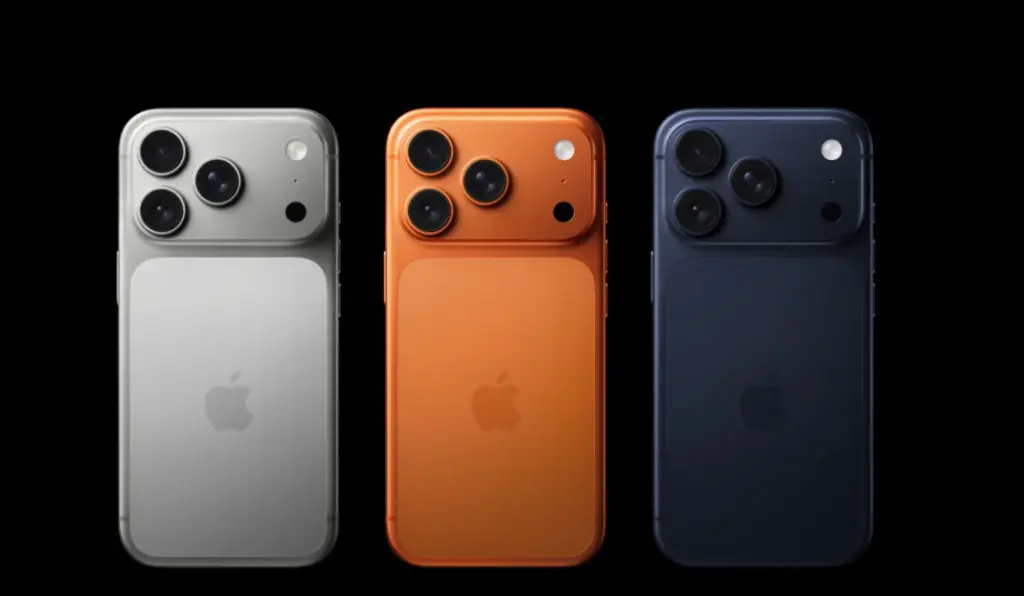
This section is about filtering noise, not chasing every screenshot that hits your feed. Colors and variants are the details people share most because they’re visual and easy to repost, which also makes them the easiest to distort. A cropped image can remove key context like the model family, the region, or the official naming, and an older screenshot can resurface weeks later and look “new” again. Treat those posts as background until you can match the exact wording on Apple’s live product pages. When you do verify something, save the line, the date stamp, and the page you used, so your buying notes stay consistent even if social chatter shifts.
How to treat color claims responsibly
Colors are where rumor culture gets the loudest because “new finish” posts spread fast and feel easy to believe, even when the names are unofficial or the photos are taken out of context. The problem is that color rumors are hard to verify until Apple’s product pages are live and the wording is fixed in plain text. The cleanest approach is to treat Apple’s published list as final and ignore anything that can’t be matched to official phrasing. To keep your notes tidy, record iphone 17 colors only from Apple’s pages, not from screenshots that could be edited, cropped, or mislabeled, and add the page date stamp so you know exactly what was current when you checked.
One detail that often gets misunderstood in Canada
In some cycles, eSIM availability and model variants become a rumor magnet, because screenshots travel faster than official product pages. The easiest way to handle it is to avoid debates and look for the exact availability language Apple publishes for your region. If you’re buying iphone 17 in Canada, confirm the model notes on Apple’s pages first, then decide whether your carrier plan setup needs anything special (number transfer steps, activation method, or plan compatibility). Store staff can be helpful, but answers may vary by location or shift, especially during launch week. When you need one reliable reference, treat
The single phrase you should only use once
People often search one exact phrase when they’re trying to sanity-check timing, especially when social posts mix up announcement day, preorder opening, and first-day availability. Use the phrase once, verify it against an official Apple Newsroom post, and then move on instead of looping through reposts and cropped screenshots. The iphone 17 release date details are easiest to validate by reading the Newsroom release that lists preorder and availability windows in plain text. If you can’t trace a claim back to that page, treat it as unverified. Save the exact line plus the date stamp so your reminders match what Apple actually published.
FAQ: Canada buying questions that come up every launch
Is it still worth buying this year?
It can be, especially if you’ve identified a real day-to-day pain point that a newer model solves. If your current phone is smooth, lasts a full day, and you’re not hitting camera or heat limits, waiting is often the calmer choice. If you do buy now, compare stock and return windows across Apple and major carriers, then choose the path that best matches how you actually shop.
Should you pick the smaller Pro or the Max?
Start with size before specs. If you commute with a small bag, use your phone one-handed a lot, or dislike heavy devices, the smaller Pro is often the better long-term fit. If your real priorities are long sessions away from a charger and a bigger screen for games and video, that’s where iphone 17 pro max can feel justified.
What should you screenshot for your records?
Screenshot the preorder time line, the availability date, and the exact spec lines you’re relying on. Include the page date stamp if it’s visible. That way, if a page changes later, you still have a reference for what was live when you made your decision.This is especially useful when you’re comparing options for iphone 17 pro across Apple and carriers, because shipping language can shift quickly.
How do you keep rumor reading from wasting your time?
Give yourself one rule: rumors can be read, but they can’t set your alarms. Only official pages should set your preorder reminders and your pickup plan. If a rumor ends up being true, you’ll still catch it when it becomes official. If it’s false, you’ve saved time and avoided planning around noise.
About The Author